Running AI models on your own ground: a practical guide
We set out to fine-tune Gemma 4 to pull financial events out of news text as clean JSON. Entities, relationships, dates. Before training, the base model already got 93% right. After 200 steps it was worse. We tried 60 steps. Worse. Forty. Still worse. We were teaching it something it already knew, and it was forgetting other things in the process.
That failure turned into the most useful experiment in this guide, so I’ll come to it properly below. But it also says something about why you’d run models yourself in the first place. When the model sits on your hardware, you get to measure it, change it and keep it the way it is. Nobody updates it under you. Your data doesn’t leave the building. And the hardware needed has become ordinary: a single consumer GPU or a recent Mac will run a capable small model, and a 4B model fine-tunes in under ten minutes on a laptop.
This is a practical guide. It covers what to run, how quantisation makes it fit, and a full tutorial for measuring whether fine-tuning helps, with the before-and-after numbers from our runs.
What to run
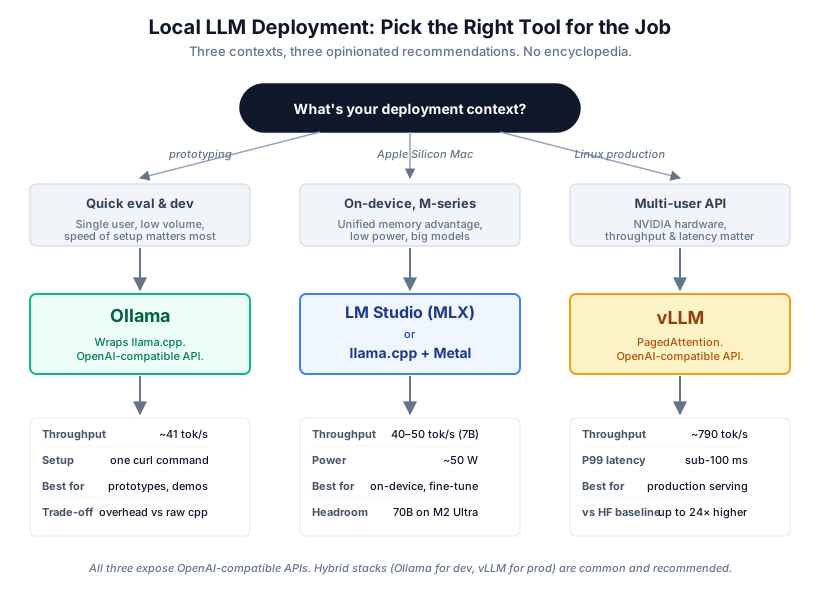
There are a dozen tools for running local models. You only need to know about three.
Prototyping: Ollama
Ollama wraps llama.cpp in a clean interface. Install it, pull a model, start talking to it. On Linux:
curl https://ollama.ai/install.sh | sh
ollama run llama3.1:8b
It exposes an OpenAI-compatible API at localhost:11434, so anything that talks to OpenAI can talk to your local model by changing the base URL. It’s slower than raw llama.cpp, but for development you won’t notice.
Apple Silicon: llama.cpp with Metal, or LM Studio with MLX
On Apple Silicon the CPU, GPU and Neural Engine share one pool of memory, so there’s no copying weights across a PCIe bus. For local inference, where moving memory around is often the bottleneck, that’s a real advantage, and the power draw is a fraction of a desktop GPU’s.
If you want a GUI with VRAM estimates and one-click downloads, use LM Studio and switch to the MLX runtime (Cmd+Shift+R). MLX is often faster than llama.cpp on these machines. If you want full control, build llama.cpp yourself:
brew install llama.cpp
# or build with Metal:
git clone --depth 1 https://github.com/ggerganov/llama.cpp.git
cd llama.cpp
cmake -B build -DGGML_METAL=ON
cmake --build build --config Release -j$(sysctl -n hw.ncpu)
An M2 Ultra with 192GB of unified memory runs a 70B model at Q5_K_M with room to spare. Most people assume that needs a data centre.
Production on Linux: vLLM
In production the hard part is concurrency. vLLM’s PagedAttention manages the KV cache in pages, which wastes far less memory and lets one GPU serve many requests at once. Throughput is many times higher than Ollama on the same hardware, with much lower tail latency.
uv pip install vllm
python -m vllm.entrypoints.openai.api_server \
  --model meta-llama/Llama-3.1-8B-Instruct \
  --tensor-parallel-size 1 \
  --port 8000
If you’re serving several users at once on NVIDIA hardware, vLLM is what you measure against.
How much hardware
| Model size | FP16 memory | Q4_K_M memory | Minimum GPU |
|---|---|---|---|
| 7B | 14 GB | 4.3 GB | RTX 3060 12GB |
| 13B | 26 GB | 8 GB | RTX 4090 24GB |
| 70B | 140 GB | 38 GB | 48GB+ or partial offload |
A 70B model at Q4_K_M will run on a 24GB card by putting most layers on the GPU and the rest in system RAM. It’s slower than full GPU inference but fine for batch work and a lot of interactive use. Allow another 10 to 20 percent for the KV cache and activations, and remember that memory grows with context length. A 4K window needs far less than 128K.
Quantisation
Quantisation stores weights at lower precision than the 16-bit floats they were trained in. It’s the reason any of this fits on ordinary hardware: a 70B model that needs 140GB at full precision fits in 38GB at 4 bits. It works because weights aren’t random. They cluster, and a good scheme exploits that structure to use fewer bits without changing behaviour much.
GGUF K-quants
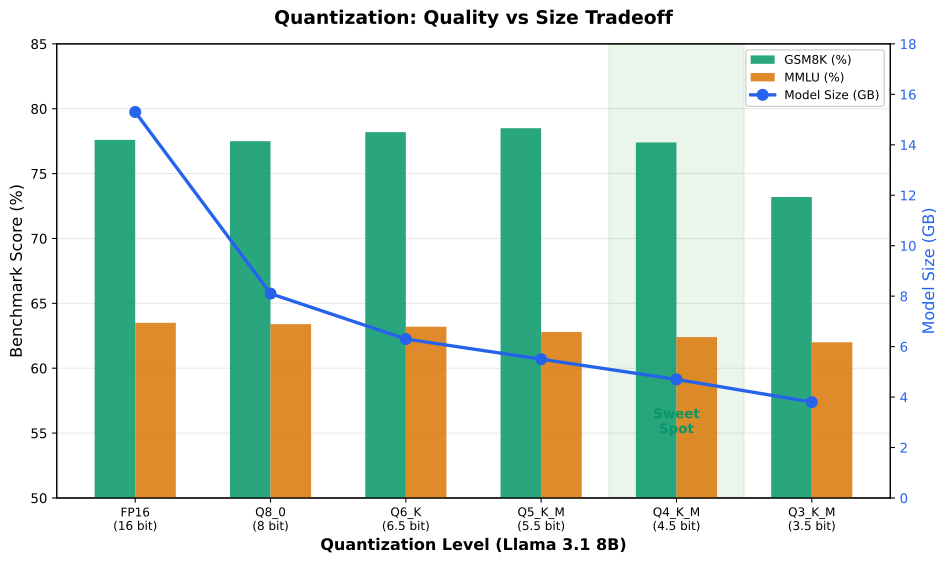
GGUF is the file format used by llama.cpp and everything built on it, so it’s the one you’ll see most. K-quants give more precision to the parts of each weight matrix that are most sensitive, which beats uniform quantisation on quality for a given size. Here’s how it plays out on Llama 3.1 8B:
| Quantisation | Effective bits | Size | GSM8K | MMLU | Perplexity increase |
|---|---|---|---|---|---|
| FP16 | 16 | 15.3 GB | 77.6% | 63.5% | baseline |
| Q8_0 | 8 | 8.1 GB | 77.5% | 63.4% | +0.01 |
| Q6_K | 6.5 | 6.3 GB | 78.2% | 63.2% | +0.03 |
| Q5_K_M | 5.5 | 5.5 GB | 78.5% | 62.8% | +0.08 |
| Q4_K_M | 4.5 | 4.7 GB | 77.4% | 62.4% | +0.24 |
| Q3_K_M | 3.5 | 3.8 GB | 73.2% | 62.0% | +0.64 |
Q4_K_M is the sweet spot: about 70% smaller for a quarter of a point of perplexity, and most people can’t tell the outputs apart. Below Q3_K_M the damage starts to show. Above Q5_K_M you’re spending memory for very little. My default is Q4_K_M, Q5_K_M when quality really matters and memory allows, Q3_K_M only for edge devices where every megabyte counts. I wouldn’t bother with Q2_K.
Other methods
AWQ (activation-aware weight quantisation) works from the observation that protecting about 1% of the most important weight channels removes most of the error. It needs calibration data and produces uniform bit widths that hardware likes. GPTQ uses approximate second-order information to quantise weights one at a time, adjusting the rest to compensate; the GPTQ paper reports a 175B model quantising in about 3.8 hours on an A100. TurboQuant, from recent research, targets the KV cache rather than the weights, which matters for long contexts where the cache dominates memory.
In practice: K-quants for GGUF inference, QLoRA at 4 bits for training (BitsAndBytes on NVIDIA, MLX on Apple Silicon), and AWQ or GPTQ through vLLM for production serving.
Tutorial: does fine-tuning help?
Most fine-tuning tutorials show an improvement, because they pick a task the base model is bad at and plenty of data to fix it. Real projects aren’t like that. Your model may already be good at the task, and fine-tuning can hurt as easily as help. After the extraction experiment above, we stopped assuming and set up a proper test: measure baselines on tasks where the model is weak and where it’s strong, fine-tune on domain data, and measure again. Every number below comes from our own runs.
Three benchmarks
We picked two domains, medicine and finance, and three benchmarks with very different starting points on Gemma 4 E4B (4-bit, MLX format):
| Benchmark | Domain | Baseline accuracy | What it tests |
|---|---|---|---|
| MedMCQA | Medical QA | 35.47% | Factual medical knowledge across 21 specialties |
| FPB | Financial sentiment | 78.76% | Classifying financial text as positive, negative or neutral |
| ConvFinQA | Financial reasoning | 5.91% | Pulling numbers from financial tables and doing the maths |
The baselines already tell you a lot. At 35% on a four-option test, the model is short on medical knowledge, so there’s room to improve. At 79% it already understands financial sentiment, which makes fine-tuning risky. At 6% it can’t do financial arithmetic at all: lots of room, and the hardest task of the three.
The model
Google released Gemma 4 on 2 April 2026 under Apache 2.0, with no usage restrictions.
| Variant | Active params | Total params | Context | Best for |
|---|---|---|---|---|
| E2B | 2.3B | 5.1B | 128K | Mobile, edge |
| E4B | 4.5B | 8B | 128K | On-device, fine-tuning |
| 26B-A4B (MoE) | 3.8B active | 25.2B total | 256K | Workstation inference |
| 31B Dense | 30.7B | 30.7B | 256K | Maximum quality |
We used E4B. It’s small enough to train on a 16GB Mac with QLoRA (it needs roughly 6 to 10 GB) and big enough to be useful. One catch: Gemma 4 E4B is a vision-language architecture even for text tasks. You load it through the VLM path (FastVisionModel rather than FastLanguageModel) and use mlx_vlm for inference rather than mlx_lm. The training data is still plain text.
Set-up
On Apple Silicon:
uv pip install 'mlx-tune>=0.4.18' mlx-vlm datasets scikit-learn tqdm numpy
That’s everything. mlx-tune brings in MLX and mlx-lm, and the version pin gets you Gemma 4 support.
Baselines first
Evaluate the base model before training anything. It takes an hour or two for all three benchmarks, and it’s the only way to know afterwards whether you helped or hurt.
MedMCQA (medical QA, 500-sample stratified subset):
import mlx_lm
import datasets
import re
import numpy as np

MODEL_ID = "mlx-community/gemma-4-e4b-it-4bit"
COP_MAP = {0: "A", 1: "B", 2: "C", 3: "D"}
SYSTEM_PROMPT = (
    "You are a medical expert. Answer the following multiple-choice question. "
    "Respond with ONLY the letter of the correct answer: A, B, C, or D. "
    "Do not explain your reasoning."
)

model, tokenizer = mlx_lm.load(MODEL_ID)
ds = datasets.load_dataset("openlifescienceai/medmcqa", split="validation")

correct = 0
for example in ds:
    user_msg = f"{example['question']}\n\nA. {example['opa']}\nB. {example['opb']}\nC. {example['opc']}\nD. {example['opd']}"
    messages = [
        {"role": "system", "content": SYSTEM_PROMPT},
        {"role": "user", "content": user_msg},
    ]
    prompt = tokenizer.apply_chat_template(messages, tokenize=False, add_generation_prompt=True)
    response = mlx_lm.generate(model, tokenizer, prompt=prompt, max_tokens=200, verbose=False)
    predicted = re.search(r'\b([ABCD])\b', response.upper())
    gold = COP_MAP.get(example["cop"])
    if predicted and predicted.group(1) == gold:
        correct += 1

print(f"MedMCQA Accuracy: {correct / len(ds) * 100:.2f}%")
FPB (financial sentiment):
from datasets import load_dataset
from sklearn.metrics import accuracy_score, f1_score

ds = load_dataset("AdaptLLM/finance-tasks", "FPB", split="test")
y_true, y_pred = [], []

for ex in ds:
    blocks = ex["input"].strip().split("\n\n")
    last_block = blocks[-1]
    prefix = "Please tell me the sentiment of the following sentence: "
    sentence = last_block[len(prefix):].split("\nOptions")[0] if last_block.startswith(prefix) else last_block
    gold = ex["options"][ex["gold_index"]]

    messages = [
        {"role": "system", "content": "You are a financial sentiment analyst. Respond with ONLY one word: positive, negative, or neutral."},
        {"role": "user", "content": sentence},
    ]
    prompt = tokenizer.apply_chat_template(messages, tokenize=False, add_generation_prompt=True)
    response = mlx_lm.generate(model, tokenizer, prompt=prompt, max_tokens=8, verbose=False)

    pred = None
    for label in ("positive", "negative", "neutral"):
        if label in response.lower():
            pred = label.capitalize()
            break
    if pred is None:
        pred = "Neutral"

    y_true.append(gold)
    y_pred.append(pred)

print(f"FPB Accuracy: {accuracy_score(y_true, y_pred) * 100:.2f}%")
print(f"FPB Macro F1: {f1_score(y_true, y_pred, average='macro') * 100:.2f}%")
ConvFinQA (financial numerical reasoning):
import re

ds = load_dataset("AdaptLLM/finance-tasks", "ConvFinQA", split="test")
correct = 0

for ex in ds:
    gold_num = None
    cleaned = str(ex.get("label", "")).replace(",", "").replace("%", "")
    m = re.search(r"-?\d+\.?\d*", cleaned)
    if m:
        gold_num = float(m.group())

    messages = [
        {"role": "system", "content": "Respond with ONLY the final numerical answer. No units or explanation."},
        {"role": "user", "content": ex["input"]},
    ]
    prompt = tokenizer.apply_chat_template(messages, tokenize=False, add_generation_prompt=True)
    response = mlx_lm.generate(model, tokenizer, prompt=prompt, max_tokens=32, verbose=False)

    pred_num = None
    m2 = re.search(r"-?\d+\.?\d*", response.replace(",", ""))
    if m2:
        pred_num = float(m2.group())

    if pred_num is not None and gold_num is not None:
        if gold_num == 0:
            match = abs(pred_num) < 0.01
        else:
            match = abs(pred_num - gold_num) / abs(gold_num) < 0.01
        if match:
            correct += 1

print(f"ConvFinQA Accuracy: {correct / len(ds) * 100:.2f}%")
Our baselines:
| Benchmark | Baseline accuracy | Samples | Runtime |
|---|---|---|---|
| MedMCQA | 35.47% | 499 | ~45 min |
| FPB sentiment | 78.76% | 970 | ~20 min |
| ConvFinQA | 5.91% | 1,490 | ~23 min |
Fine-tuning both domains with the same settings
To keep the comparison fair we used one QLoRA configuration for both: LoRA rank 16 and alpha 16, 60 steps, learning rate 1e-4 with linear decay, gradient accumulation of 4, warmup ratio 0.1, maximum sequence length 512. That trains 36.7M parameters, 0.49% of the total.
For medicine we used 5,000 examples from ChatDoctor-HealthCareMagic-100k, real patient and doctor Q&A pairs with instruction, input and output columns, converted into the VLM chat format:
from mlx_tune import FastVisionModel, UnslothVisionDataCollator, VLMSFTTrainer
from mlx_tune.vlm import VLMSFTConfig
from datasets import load_dataset

BASE_MODEL = "mlx-community/gemma-4-e4b-it-4bit"

model, processor = FastVisionModel.from_pretrained(model_name=BASE_MODEL, load_in_4bit=True)

model = FastVisionModel.get_peft_model(
    model,
    r=16, lora_alpha=16, lora_dropout=0,
    finetune_vision_layers=False,
    finetune_language_layers=True,
    finetune_attention_modules=True,
    finetune_mlp_modules=True,
    bias="none", use_rslora=False, random_state=3407,
)

ds = load_dataset("lavita/ChatDoctor-HealthCareMagic-100k", split="train", trust_remote_code=True)
ds = ds.shuffle(seed=42).select(range(5000))

train_data = []
for ex in ds:
    instruction = ex.get("instruction", "").strip()
    inp = ex.get("input", "").strip()
    output = ex.get("output", "").strip()
    if not instruction or not output:
        continue
    user_text = instruction + (f"\n\n{inp}" if inp else "")
    train_data.append({
        "messages": [
            {"role": "user", "content": [{"type": "text", "text": user_text}]},
            {"role": "assistant", "content": [{"type": "text", "text": output}]},
        ]
    })

FastVisionModel.for_training(model)

trainer = VLMSFTTrainer(
    model=model, tokenizer=processor,
    data_collator=UnslothVisionDataCollator(model, processor),
    train_dataset=train_data,
    args=VLMSFTConfig(
        per_device_train_batch_size=1,
        gradient_accumulation_steps=4,
        warmup_ratio=0.1,
        max_steps=60,
        learning_rate=1e-4,
        logging_steps=5,
        optim="adam",
        weight_decay=0.001,
        lr_scheduler_type="linear",
        seed=3407,
        output_dir="models/medical_lora",
        report_to="none",
        remove_unused_columns=False,
        dataset_text_field="",
        dataset_kwargs={"skip_prepare_dataset": True},
        max_length=512,
    ),
)

trainer.train()
model.save_pretrained("models/medical_lora")
processor.save_pretrained("models/medical_lora")
Training took 7.6 minutes on an M-series Mac. Loss fell from 8.06 to 3.93 over the 60 steps.
For finance we used 2,000 examples from gbharti/finance-alpaca, general financial instruction data covering everything from portfolio theory to risk management. Same configuration, same 60 steps, similar time:
ds = load_dataset("gbharti/finance-alpaca", split="train", trust_remote_code=True)
ds = ds.shuffle(seed=42).select(range(2000))

train_data = []
for ex in ds:
    instruction = ex.get("instruction", "").strip()
    inp = ex.get("input", "").strip()
    output = ex.get("output", "").strip()
    if not instruction or not output:
        continue
    user_text = instruction + (f"\n\n{inp}" if inp else "")
    train_data.append({
        "messages": [
            {"role": "user", "content": [{"type": "text", "text": user_text}]},
            {"role": "assistant", "content": [{"type": "text", "text": output}]},
        ]
    })
Results
We re-ran the same benchmarks on the fine-tuned models: the medical model on MedMCQA, the finance model on FPB and ConvFinQA.
| Benchmark | Baseline | After fine-tuning | Change | Direction |
|---|---|---|---|---|
| MedMCQA (medical FT) | 35.47% | 42.28% | +6.81 | Improved |
| FPB (finance FT) | 78.76% | 50.41% | -28.35 | Degraded |
| ConvFinQA (finance FT) | 5.91% | 20.94% | +15.03 | Improved |
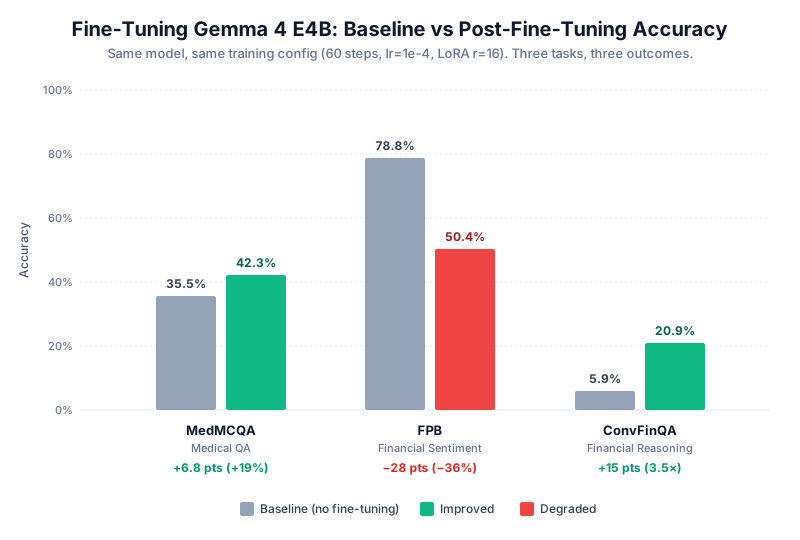
Three benchmarks, three different outcomes.
MedMCQA went from 35.5% to 42.3%, a 19% relative gain. The baseline was barely above guessing (25% on four options). Five thousand medical Q&A pairs taught it some facts it didn’t have. A modest improvement, but a real one, and unparseable answers dropped from 1.6% to zero.
FPB fell from 78.8% to 50.4%. That’s a 36% relative drop, and it’s the result I’d want every team to see before they fine-tune anything. The finance-alpaca data is broad financial instruction, not sentiment. Training on it overwrote a skill the model already had. Catastrophic forgetting, in a few minutes, on a laptop.
ConvFinQA tripled, from 5.9% to 20.9%. The base model essentially couldn’t do arithmetic on financial tables, and afterwards it sometimes could. Twenty-one percent is still poor. Numerical reasoning is hard for a 4.5B model, and 60 steps of QLoRA doesn’t change that.
What to take from it
Fine-tuning improves what the model is bad at and can damage what it’s already good at. That isn’t news in the research literature; it’s the basic tension of transfer learning. Seeing it on one model, with one set of training settings, across three tasks, makes it much harder to ignore.
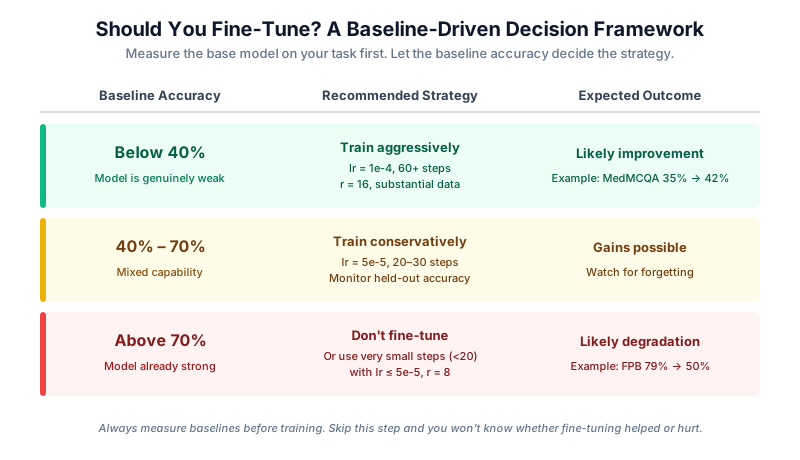
The rough rule I now use:
| Baseline accuracy | Fine-tuning approach | Likely outcome |
|---|---|---|
| Below 40% | Train hard (lr=1e-4, 60+ steps) | Improvement |
| 40 to 70% | Train gently (lr=5e-5, 30 to 40 steps) | Possible improvement, watch closely |
| Above 70% | Don’t, or use very gentle settings | Degradation |
Measure baselines first. If you skip it you’ll ship a worse model and spend weeks wondering why downstream numbers dropped.
Exporting and serving
Save the LoRA adapters (about 700MB for Gemma 4 E4B):
model.save_pretrained("models/medical_lora")
processor.save_pretrained("models/medical_lora")
To use them, reload the base model, apply the same LoRA config and inject the adapter weights:
import mlx.core as mx
from mlx_tune import FastVisionModel
import mlx_vlm

model, processor = FastVisionModel.from_pretrained(
    "mlx-community/gemma-4-e4b-it-4bit", load_in_4bit=True
)
model = FastVisionModel.get_peft_model(model, r=16, lora_alpha=16, ...)
weights = mx.load("models/medical_lora/adapters.safetensors")
lora_keys = [k for k in weights.keys() if k.endswith((".A", ".B"))]
lora_weights = {k: weights[k] for k in lora_keys}
model.model.load_weights(list(lora_weights.items()), strict=False)
FastVisionModel.for_inference(model)
save_pretrained_merged() doesn’t reliably produce a standalone model from a quantised Gemma 4 base. The LoRA A and B matrices stay in the saved weights and mlx_vlm.load() rejects them, which is why we inject the adapters in memory as above.
For GGUF, fuse the adapters into the non-quantised base (mlx-community/gemma-4-e4b-it, without the -4bit suffix) and export with mlx_lm.fuse. Starting from the 4-bit base won’t work.
python -m mlx_lm.fuse \
  --model mlx-community/gemma-4-e4b-it \
  --adapter-path models/medical_lora \
  --save-path models/medical_merged \
  --export-gguf \
  --gguf-path gemma-medical.Q4_K_M.gguf
Then serve it with Ollama:
FROM ./gemma-4-e4b-it.Q4_K_M.gguf
PARAMETER temperature 0.1
SYSTEM "You are a medical expert assistant."
ollama create gemma-medical -f Modelfile
Problems you’ll probably hit
These are the ones that cost us time.
- Forgetting when the baseline is strong. FPB went from 79% to 50% after 60 steps at lr=1e-4. If a task is already above 70%, either leave it alone or go very gently (max_steps=20, lr=5e-5, r=8). If you have to fine-tune for another reason, such as output format, train on responses only and watch a held-out set.
- Loading Gemma 4 the wrong way. It’s a VLM architecture. Use
FastVisionModelandVLMSFTTrainerfor training andmlx_vlmfor inference. The language-model path fails or produces garbage, in both mlx-tune and Unsloth. - Wrong data shape for VLM training. The trainer wants a list of dicts with a
"messages"key and typed content blocks ([{"type": "text", "text": "..."}]). The older"conversations"format or plain strings will breakUnslothVisionDataCollator. - No
model.generate()on merged VLM models. Callmlx_vlm.generate(model, processor, prompt=..., max_tokens=..., verbose=False)instead. - Case-sensitive dataset configs. AdaptLLM/finance-tasks wants
"FPB"and"ConvFinQA". Lowercase fails with a config-not-found error. - FPB inputs need parsing. The sentence is buried in a multi-paragraph block. Split on
"Please tell me the sentiment of the following sentence: "and then on"\nOptions". The gold label isex["options"][ex["gold_index"]]. - ConvFinQA uses
inputandlabel, notoutput. The label is a string, so pull the number out with a regex and compare with 1% relative tolerance. - MedMCQA needs room to think. The model emits thinking tokens before answering. With max_tokens=8 the answer often gets cut off, so use 200 and extract the letter with
re.search(r'\b([ABCD])\b', response.upper()). - NaN gradients when training Gemma 4 on images. As of mlx-tune 0.4.18 there’s a backward-pass issue in mlx-vlm. Text-only training is fine. For vision fine-tuning, use Qwen3.5.
- CUDA version mismatches. Check
nvcc --versionandnvidia-smi, then install the matching PyTorch wheel, for exampleuv pip install torch --index-url https://download.pytorch.org/whl/cu121. - Running out of memory. VLM training forces a batch size of 1, so use gradient accumulation for bigger effective batches and drop
max_lengthto 256 if needed. On a Mac, close other apps, because unified memory is shared with everything. On 8GB Macs use E2B instead of E4B. - Thermal throttling. GPUs throttle quietly when they get hot. If inference is slower than it should be, check temperatures with
nvidia-smi. Macs manage this themselves, but you’ll see it as slowdowns on long runs.
Where I’d go next
Match your training data to the thing you’re trying to improve. Our finance data helped arithmetic and wrecked sentiment because it wasn’t about sentiment. Try fewer steps and lower learning rates for tasks in the middle band. Scale the data carefully: more examples will probably give bigger gains on weak tasks and more forgetting on strong ones.
And if you develop on a Mac and train at scale on NVIDIA, the mlx-tune API mirrors Unsloth closely. Change the imports and model names and the data format and training loop stay the same.
What I like about doing all this locally is that every step is yours: the weights, the data, the measurements and the decision to ship or not. That’s the same idea behind what we’re building with Kizuna and Voxeltron, applied to the software your agents write and run. If you’re working on something similar, we’d like to hear from you.